For diners
How to give a restaurant private feedback
Something was off with your meal and you’d rather tell the owner than the internet. Or it was wonderful and you want them to know. Here are the ways to reach a restaurant privately, what each is good for, and where Bentu fits.
Why tell the restaurant instead of posting a review
Public review sites put you in an awkward spot. Your soup was cold, but do you really want to knock a family-run restaurant’s rating down for everyone, forever? Most people don’t — so they say nothing, and the restaurant never finds out. The kitchen keeps sending out cold soup, and diners keep quietly not coming back.
Private feedback removes the stakes. Your note goes to the people who can actually fix the problem — the owner and their team — as a message, not a public verdict. You can be honest without being a critic, and generous without writing an essay.
It works in the other direction too. When a meal is great, a private “that pasta was incredible” lands personally with an owner in a way one more anonymous five-star rating never will.
1. Tell your server or a manager before you leave
It’s the fastest way, and the only one that can still fix this meal: a dish remade, a drink replaced, a long wait explained. You don’t need to make a scene. Tell your server when they check on you, or ask quietly for the manager.
It’s also the hardest for many people, because it happens face to face. If you’d rather not, any of the ways below still reaches the restaurant, just not while you’re still at the table.
2. Email or message the owner afterward
Once you’re home, write to the owner. Look for an email address or a contact form on the restaurant’s website, or send a message to its social media account. Say when you visited, what you ordered and what happened, keep it short, and say whether you’d like a reply.
The catch: not every restaurant lists an address, and a shared inbox may not reach the person who can fix the problem.
3. Use the feedback code on the table or the receipt
Many restaurants put a QR code on the table, the check or the receipt that opens a short form for the owner. It takes a minute on your phone and no conversation at all.
Read the words beside the code before you scan. A private form for the owner is a different thing from a link that asks you to post a public review.
4. Use Bentu, at any restaurant
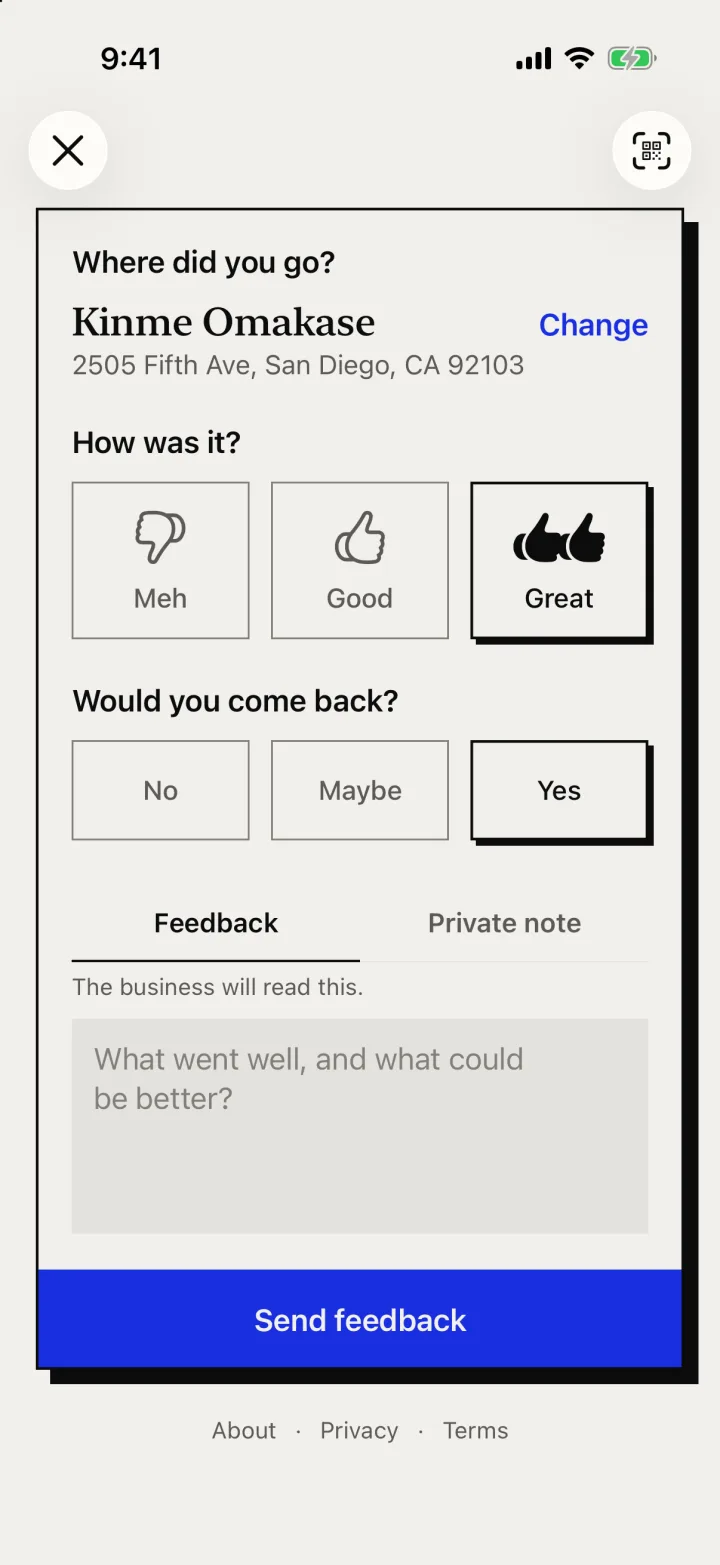
Bentu is a private feedback app that works at any restaurant, with or without a code on the table. Open bentu.co, search for the place, choose Meh, Good or Great, say whether you’d come back, and add a few words if you like. Nothing is posted publicly.
If the restaurant has claimed its page on Bentu, its team reads your feedback in a private dashboard, and on its trial or Founding Member plan it can reply to you if you have a Bentu account. If it hasn’t claimed its page yet, nobody there reads it until it does, so to reach that restaurant today, tell the staff or write to the owner. Either way, the visit stays in your own food journal.
What to say so it helps
Whichever way you choose, a few details turn a complaint into something a kitchen can act on:
- Be specific: the dish, the day and time, what happened.
- Say what you expected, or what would have made it right.
- Describe what happened, not the person: “our mains came 40 minutes after we ordered” rather than “the server was useless.”
- Mention what went well too. It tells them what to keep.
- Say whether you’d come back. It tells the owner what’s at stake.
- Send it soon, while you remember the details and they can still look into it.
What the restaurant sees on Bentu (and what it doesn’t)
The restaurant sees your rating, whether you’d come back, your words and when you visited. It never sees your name or your account. If you choose to add an email or phone number, the restaurant may see it so it can follow up. A private note on the same form is only for you. Nothing is published as a review, shown to other diners or counted in a public score.
Meanwhile, everything you write stays in your own food journal: every place you rate lands on your personal passport map, joins your rankings, and keeps your notes about what you ordered. Your feedback helps the restaurant; your history belongs to you.
How it works on Bentu
Step 1
Find the restaurant
Scan the Bentu QR code on the table, or search for any restaurant in the app. No download needed — it’s all on the web.
Step 2
Leave quick, private feedback
Thumbs up or down, plus a note if you have more to say. It takes under a minute, right when the meal is fresh in your mind.
Step 3
The restaurant hears you — privately
Restaurants that have claimed their page on Bentu read it in a private dashboard. Nothing is posted publicly, ever.
Frequently asked questions
How do I give a restaurant feedback without leaving a review?
Tell your server or a manager before you leave, email the owner afterward, scan the restaurant’s feedback code if it has one, or use Bentu to send private feedback to any restaurant you search for. None of these is posted publicly.
Is my feedback anonymous?
Yes, unless you choose otherwise. The restaurant sees your rating, whether you’d come back, your words and when you visited, never your name or your account. If you add an email or phone number, the restaurant may see it so it can follow up. Nothing is ever published.
Can the restaurant reply to me?
If you have a Bentu account and the restaurant is on Bentu’s trial or Founding Member plan, it can reply, and you read the reply in your messages on Bentu. Without an account, your feedback still reaches the restaurant, but it can’t reply on Bentu.
Does the restaurant have to be on Bentu?
No. You can leave feedback and keep notes for any restaurant, and it always becomes part of your personal food journal. A restaurant reads your feedback once it has claimed its page on Bentu. To reach a restaurant that hasn’t, tell the staff or write to the owner directly.
Is Bentu free?
Yes — completely free for diners: feedback, rankings, lists, notes, and the passport map.
Do I need to download an app?
No. Bentu runs in your browser. Scan a QR code or visit bentu.co and you’re in.
Can I still write public reviews elsewhere?
Of course. Bentu doesn’t stop you from reviewing anywhere else — it just gives you a private channel that most situations actually call for.
Say it to the chef, not the internet
Free for diners. No public reviews, ever.